May 14, 2025
ResearchBest Apple Wallet alternatives
Apple Wallet is great for tap-to-pay and boarding passes, but it has limitations. Discover five powerful iOS apps that fill Wallet's gaps: secure document storage, multi-card management, and automated trip planning.
You're at the Italian border. The officer asks for your residence permit. You open Apple Wallet, scroll past your credit cards and last month's boarding pass, and realize: your permesso di soggiorno isn't there. It never was. Apple Wallet doesn't store identity documents. It doesn't store insurance cards, vaccination records, or visa PDFs. It stores exactly what Apple has decided counts as a "pass," and your critical documents don't make the list.
This is the gap between expectation and reality. Apple Wallet handles tap-to-pay beautifully. It syncs boarding passes automatically. But the moment you need something that isn't a payment card or a .pkpass file from a participating provider, you're searching through Photos, Files, or your email. The passes you do have appear scattered by date added rather than organized into trips. You can't share a hotel confirmation with your partner. You can't set a reminder for when your passport expires.
The solution isn't to abandon Apple Wallet. It's to add specialist apps that solve the problems Apple ignores. Here are the alternatives worth installing in 2025.
For documents Apple Wallet won't accept
Folio stores everything Apple Wallet refuses: passports, residence permits, driver's licenses, insurance policies, vaccination certificates, medical records. Photograph a document and Folio extracts the key data automatically. Set it up once and you get notifications before documents expire. When someone needs to see your insurance details, generate a secure link that expires after they've viewed it.
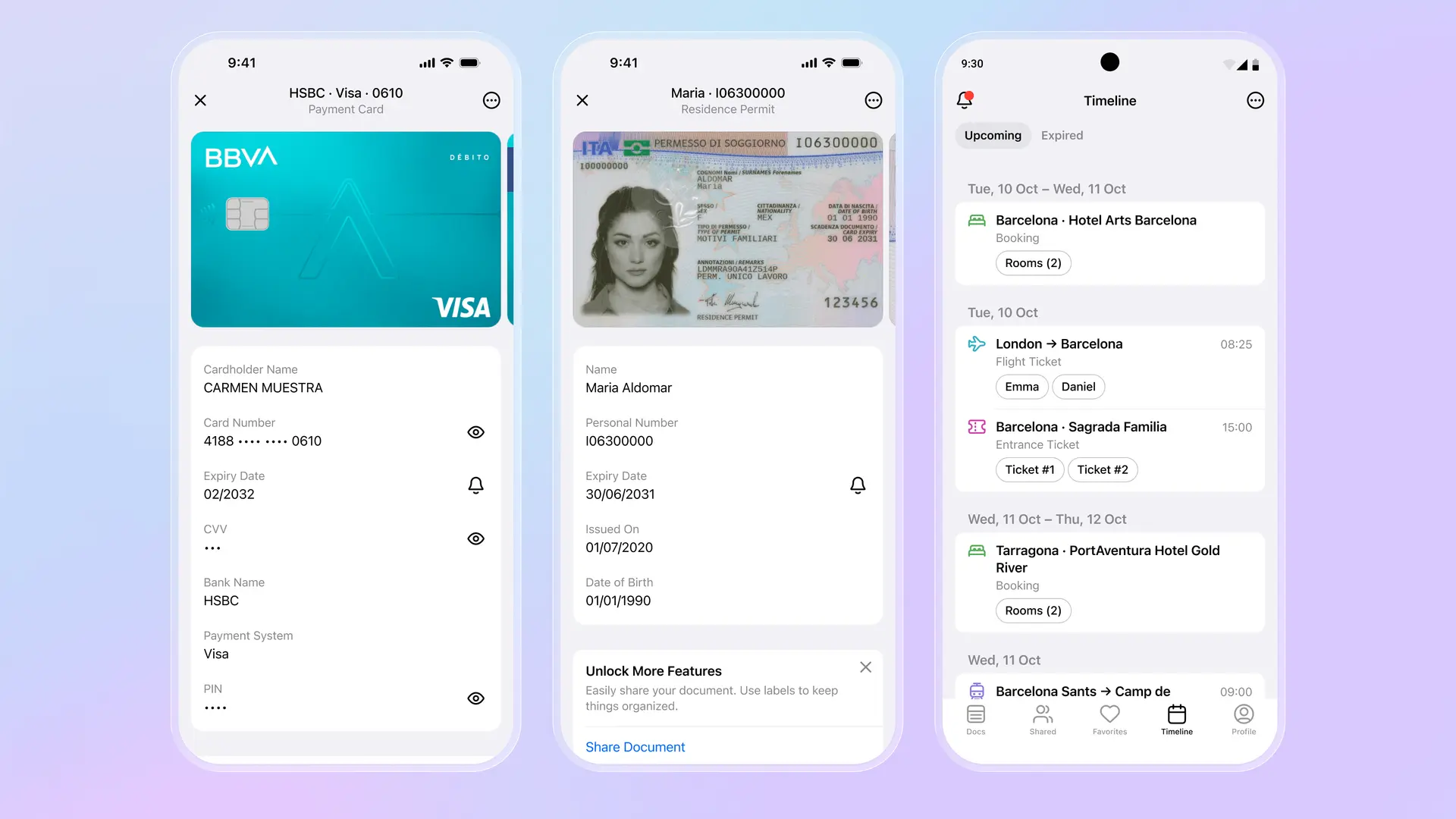
The real difference shows when you travel. Apple Wallet displays your boarding pass. Folio shows your entire trip in chronological order: the flight, the hotel in Barcelona, the Sagrada Familia tickets, the train to Tarragona, the return journey. Tap any item and the barcode or QR code is ready to scan. Everything works offline because the documents live on your device with end-to-end encryption. For families, shared folders let everyone access the same documents without messaging files back and forth.
For managing multiple payment cards
Curve solves a different problem: too many cards. Link all your Visa and Mastercard accounts to Curve, then add just Curve to Apple Wallet. At checkout, one card handles everything. Later, you decide which underlying account actually pays. Made a purchase on the wrong card? "Go Back in Time" moves the charge up to 30 days later. For people who optimize credit card rewards by category, Curve eliminates the fumbling to find the right card before paying.
Curve also shows exchange rates before international purchases, unlike Apple Wallet which just charges your bank's rate and reveals the damage on your statement days later. The free tier covers basic card aggregation. Paid tiers add fee-free ATM withdrawals abroad, higher limits, and cashback at selected retailers.
For trips that involve more than a flight
TripIt builds itineraries automatically. Forward any confirmation email to plans@tripit.com and it assembles a master timeline: flights, hotels, restaurant reservations, rental cars, concert tickets. The Pro tier monitors flights for delays and gate changes faster than most airline apps, tracks seat availability for upgrades, and even claims refunds when airlines owe you money. Apple Wallet shows passes in isolation; TripIt shows your entire trip as a story.
Pass2U Wallet handles the passes Apple Wallet rejects. That gym membership with a barcode, the loyalty card from a local shop, the ticket that arrived as a PDF instead of a proper .pkpass file: Pass2U converts images into wallet passes. It's not elegant, but it solves the frustration of passes that exist only as screenshots or email attachments.
Building your stack
The point isn't to replace Apple Wallet. Tap-to-pay through the Secure Element remains the fastest and most secure way to pay. Express Mode for transit cards and keys works better than any third-party app could. But Apple Wallet is a foundation, not a complete solution. Add Folio for documents and trip organization. Add Curve if you juggle multiple cards. Add TripIt if you travel frequently and want everything in one timeline.
The best digital wallet in 2025 isn't a single app. It's a combination that matches how you actually live. Keep Apple Wallet for payments and passes that work natively. Fill the gaps with apps that solve the specific problems Apple hasn't addressed. The result is fewer "where did I save that?" moments and more confidence that everything you need is one tap away.
Download Folio Wallet
Available free on iOS and Android


Keep reading

Best identity verification platforms in 2025
Research
Dec 19, 2025
Best identity verification platforms in 2025
Research
Dec 19, 2025
The EU is giving everyone a digital ID wallet. Here's what that means.
Product
Oct 25, 2025
The EU is giving everyone a digital ID wallet. Here's what that means.
Product
Oct 25, 2025
How NFC chip scanning verifies your passport in seconds
Business
Oct 20, 2025
How NFC chip scanning verifies your passport in seconds
Business
Oct 20, 2025