Apr 29, 2025
ResearchBest document scanning apps for iPhone and Android
Turn your phone into a powerful scanner. Discover the best apps to scan, store, and organize your documents securely.
You're at a car rental counter in Lisbon. They need a copy of your passport and driver's license. You have the physical documents in your hand, but they want scans to keep on file. Now you're searching for a copy shop while your rental car sits waiting. This scenario repeats at hotel check-ins, visa applications, apartment rentals, and insurance claims. The solution is simple: scan your important documents before you need them.
Every smartphone can take photos, but a photo of a document isn't a scan. It has shadows, perspective distortion, and poor contrast. A proper scanning app detects document edges, corrects the angle, adjusts lighting, and produces a clean PDF that looks like it came from an office scanner. The difference matters when someone needs to read the fine print on your insurance policy or verify the details on your passport.
Different documents need different apps. A passport requires secure storage with encryption. A receipt needs to be organized for expense tracking. A whiteboard photo needs to become editable text. Here's what actually works for each situation.
For passports, IDs, and sensitive documents
When you scan a passport, you're creating a file that could be used for identity theft. Security isn't optional. The scanning app needs end-to-end encryption, biometric authentication, and ideally zero-knowledge architecture where even the app provider can't access your files.
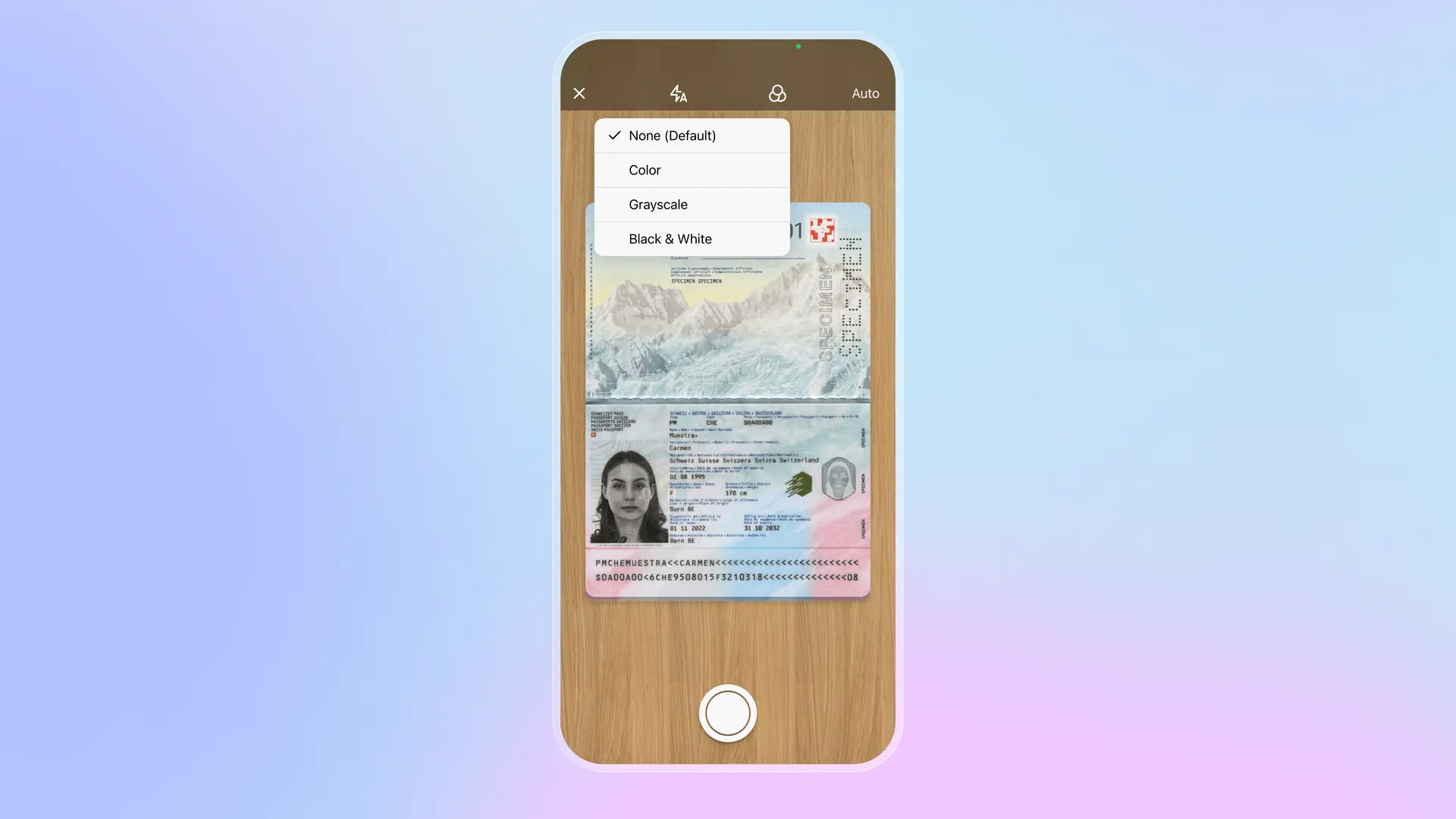
Folio is built specifically for identity documents. Scan your passport and the app automatically recognizes the document type, extracts your name, nationality, document number, and expiry date, and stores everything with AES-256 encryption. When your passport expires in six months, you get a reminder. When you need to share a copy with a hotel, you generate a secure link that expires after viewing. The same applies to driver's licenses, national IDs, visas, and insurance cards. Everything stays organized by category and accessible offline when you're abroad without data.
For work and business documents
Adobe Scan produces the highest quality scans for professional use. The OCR is accurate enough to make scanned contracts fully searchable. Scans integrate directly with Adobe Acrobat for editing, signing, and commenting. If you work with legal documents, formal agreements, or anything that needs to look polished, Adobe Scan delivers results that match dedicated office scanners. The free tier handles most needs. Paid upgrades add more storage and advanced editing.
Microsoft Lens shines for office workflows. Scan a whiteboard after a meeting and convert it to editable text in Word. Photograph handwritten notes and turn them into a searchable document. Everything syncs automatically to OneDrive and integrates with Teams, Outlook, and the rest of Microsoft 365. For anyone already in the Microsoft ecosystem, Lens is free and seamless.
For receipts and everyday scanning
Genius Scan does one thing well: fast, clean PDF creation. Point your camera at a receipt, document, or note, and the app captures it instantly with automatic edge detection. No account required, no complicated features to navigate. Export to your cloud service of choice. For people who scan occasionally and want simplicity over features, Genius Scan gets out of the way.
CamScanner offers more organization for frequent scanning. Batch scanning handles multi-page documents quickly. Built-in annotation lets you mark up scans before sharing. The app has been around for years and handles everyday scanning needs reliably. Free tier available with paid upgrades for additional storage.
Choosing the right app
The documents you scan most often should determine your choice. If you travel frequently and need your passport, visa, and insurance accessible anywhere with real security, Folio combines scanning with encrypted storage designed for identity documents. If you handle contracts and legal documents professionally, Adobe Scan's quality and Acrobat integration justify the ecosystem investment. If you live in Microsoft 365 for work, Lens integrates without adding another app to manage. If you just need to scan a receipt occasionally, Genius Scan is simple and free.
Most people benefit from two apps: one for sensitive identity documents with proper encryption, and one for everyday scanning where convenience matters more than security. A scanned passport stored in a general-purpose app with weak security is a liability. A grocery receipt doesn't need military-grade protection. Match the app to what you're scanning, and you'll have the right document available exactly when someone asks for it.
Download Folio Wallet
Available free on iOS and Android


Keep reading
Best identity verification platforms in 2025
Research
Dec 19, 2025
Best identity verification platforms in 2025
Research
Dec 19, 2025
The EU is giving everyone a digital ID wallet. Here's what that means.
Product
Oct 25, 2025
The EU is giving everyone a digital ID wallet. Here's what that means.
Product
Oct 25, 2025
How NFC chip scanning verifies your passport in seconds
Business
Oct 20, 2025
How NFC chip scanning verifies your passport in seconds
Business
Oct 20, 2025