Aug 25, 2025
GuidesThe complete guide to digital identity verification
A practical guide to identity verification: how it works, why it matters, and how to implement it without losing users along the way.
Someone signs up for your service. They could be exactly who they claim to be. Or they could be using a stolen identity, a fake document, or someone else's credentials entirely. How do you tell the difference?
Identity verification answers this question. It confirms that the person on the other side of the screen is real, that their documents are genuine, and that they match what they claim. This guide explains how it works, why different approaches exist, and how to implement verification without driving users away.
What happens during verification
A typical verification takes 30 seconds to 2 minutes from the user's perspective. Behind that simple experience is a multi-step process:
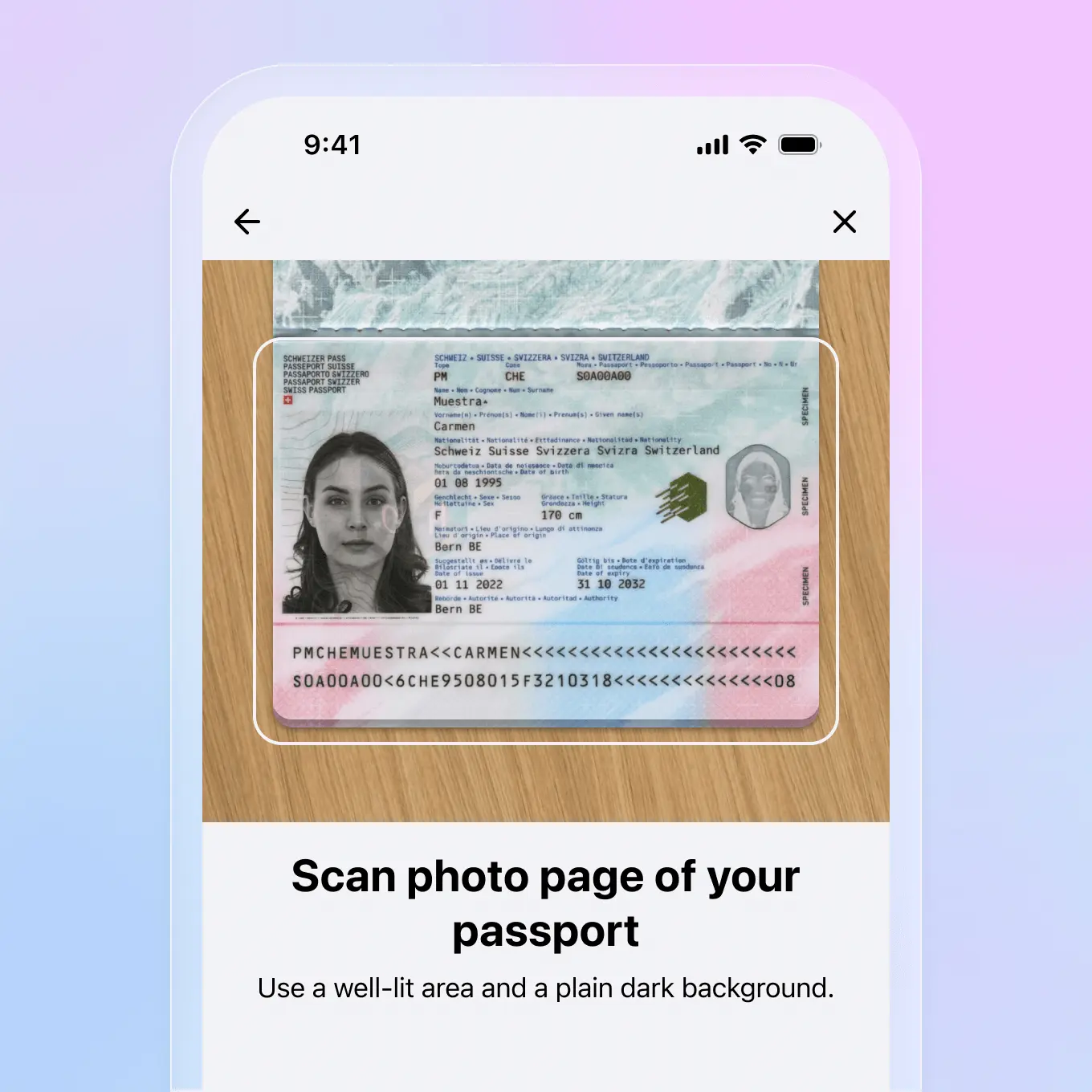
Document capture: The user photographs their ID, passport, or driver's license. Good systems guide them: "Move into better light," "Hold the document flat," "Capture the entire card." This guidance dramatically reduces failed attempts.
Document analysis: AI examines the image for signs of tampering, checks security features, and extracts text. Is this a real passport or a photoshopped image? Are the holograms present? Does the font match known templates? Within seconds, the system has an answer.
Face matching: The user takes a selfie. Algorithms compare it to the photo on the document. The question is simple: is this the same person? Modern systems achieve over 99% accuracy.
Liveness detection: Is the person actually there, or is someone holding up a photo? Liveness checks analyze subtle cues like skin texture and eye reflections, or ask the user to turn their head. This stops the most common fraud attempts.
Decision: All signals combine into a verdict: approved, rejected, or referred for human review. Most legitimate users pass in under a minute.
Why verification fails (and how to fix it)
Most verification failures are not fraud. They are user experience problems:
- Bad lighting: Users try to scan documents in dim rooms. Solution: real-time feedback that tells them to move somewhere brighter.
- Blurry images: Shaky hands, dirty camera lenses. Solution: automatic retake prompts before submission.
- Wrong document: Users submit utility bills instead of ID cards. Solution: clear instructions with visual examples.
- Expired documents: The passport expired last month. Solution: tell users upfront which documents you accept.
- Glare and shadows: The hologram creates a reflection that obscures text. Solution: multi-frame capture that stitches together the best parts.
Fixing these issues can improve pass rates by 20-30%. That is 20-30% more users who complete signup instead of abandoning.
The technologies that make it work
OCR (Optical Character Recognition): Reads text from documents. Modern OCR handles different fonts, languages, and layouts. It extracts names, dates, document numbers, and other fields automatically.
NFC chip reading: Many passports and ID cards contain chips with cryptographically signed data. Reading this chip proves the document is genuine and unaltered. It is the most secure verification method available, but requires the user to have a phone with NFC capability.
Face matching: Deep learning models compare facial features between the selfie and document photo. They account for aging, lighting differences, and angle variations. False match rates are now below 0.1%.
Liveness detection: Distinguishes real faces from photos, videos, or masks. Passive liveness works from a single image. Active liveness asks users to perform actions. Both have trade-offs between security and user friction.
When to verify (and how much)
Not every service needs the same level of verification. Match your approach to your risk:
Low risk (social apps, content platforms): Basic document check. Confirm the document is real and belongs to an adult. Fast, low friction, catches obvious fraud.
Medium risk (marketplaces, rentals): Document check plus face matching. Confirm the user matches their document. Reasonable friction for the trust you are building.
High risk (financial services, gambling): Full verification with liveness detection, potentially NFC reading. Add database checks against sanctions lists. Higher friction, but regulatory requirements demand it.
The key is proportionality. Do not ask for NFC passport scans to create a social media account. Do not skip liveness detection when opening bank accounts.
The compliance landscape
KYC (Know Your Customer): Financial services must verify customer identities before providing services. The specifics vary by country, but the principle is universal: know who you are dealing with.
ID verification
Check official documents and confirm identity in more than 200 places around the world.
AML (Anti-Money Laundering): Goes beyond initial verification. Requires ongoing monitoring, transaction screening, and suspicious activity reporting. Applies to banks, crypto exchanges, and increasingly to other financial services.
Age verification: Gambling, alcohol delivery, and adult content all require confirming users meet minimum age requirements. Different jurisdictions have different standards for what counts as sufficient proof.
GDPR and privacy: Verification involves processing sensitive personal data, including biometric data. You need a legal basis for processing, clear privacy notices, and appropriate security measures. Data minimization matters: do not collect more than you need.
What is coming next
EUDI (European Digital Identity): The EU is building a framework for digital identity wallets. Citizens will store verified credentials on their phones and share them with services. Instead of re-verifying every time, users prove their identity from a trusted wallet. Folio is already EUDI compatible, positioning businesses for this shift.
Reusable credentials: Verify once, use everywhere. After initial verification, users receive credentials they can share with other services. This reduces friction dramatically while maintaining trust.
Privacy-preserving verification: Prove you are over 18 without revealing your birthdate. Prove you live in a country without revealing your address. Cryptographic techniques make this possible, and adoption is growing.
Making verification work for users
The best verification is invisible. Users should feel like they are signing up, not filing paperwork. A few principles help:
- Explain why: "We verify your identity to keep the platform safe" converts better than a sudden ID request.
- Show progress: "Step 2 of 3" reduces abandonment.
- Handle failures gracefully: When verification fails, explain what went wrong and how to fix it.
- Offer alternatives: If passport verification fails, can they try a driver's license?
- Remember them: Do not make verified users re-verify unnecessarily.
Identity verification is a balance. Too little security creates fraud risk. Too much friction drives users away. The right approach matches your risk level, meets your compliance requirements, and respects your users' time.
Start with your requirements. Test with real users and real documents. Measure pass rates and drop-off points. Iterate until verification feels like a natural part of your user experience, not an obstacle to overcome.
Want to see what good verification feels like from the user side? Try Folio and store your own documents. It shows you what a smooth verification experience looks like.
Download Folio Wallet
Available free on iOS and Android


Keep reading

Best identity verification platforms in 2025
Research
Dec 19, 2025
Best identity verification platforms in 2025
Research
Dec 19, 2025
The EU is giving everyone a digital ID wallet. Here's what that means.
Product
Oct 25, 2025
The EU is giving everyone a digital ID wallet. Here's what that means.
Product
Oct 25, 2025
How NFC chip scanning verifies your passport in seconds
Business
Oct 20, 2025
How NFC chip scanning verifies your passport in seconds
Business
Oct 20, 2025