Jun 3, 2025
SafetyWhy you need a digital copy of your passport
Discover the benefits of keeping a digital passport copy: instant access, emergency backup, faster check-ins, and secure storage. Essential for every traveler.
You need your passport number at airport check-in. It's buried in your luggage. Or the hotel receptionist asks for your passport details, and you're not comfortable leaving your actual passport at the front desk. Or you're filling out a visa application form and can't remember your exact issue date.
These moments happen constantly when traveling. Having a digital copy of your passport solves all of them instantly. It's not about replacing your physical passport, it's about having your essential information accessible whenever you need it, without the risk of carrying your original document everywhere.
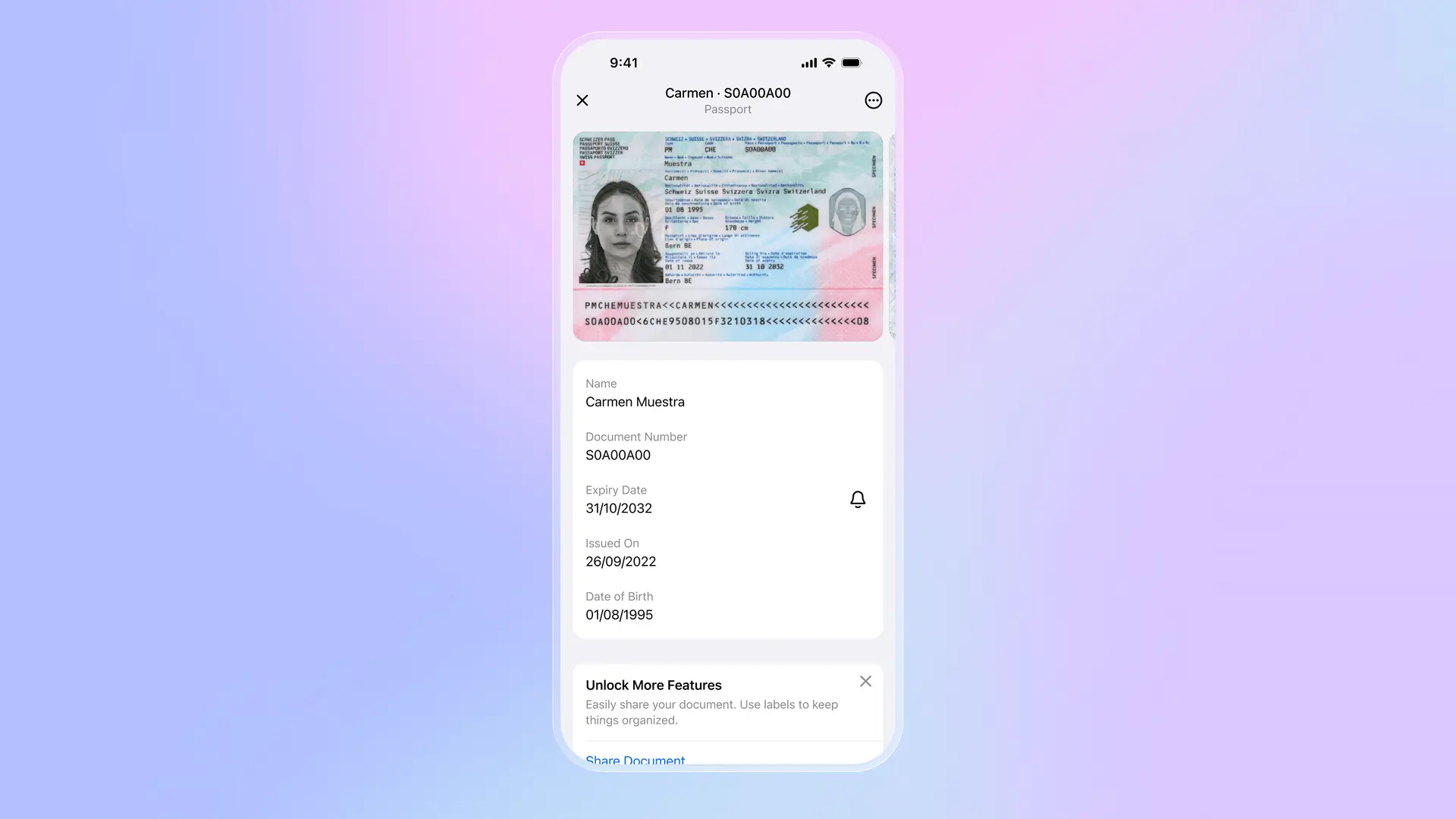
Why keep a digital passport copy
A digital passport copy transforms how you travel. Here's why every traveler should have one:
Instant access to your information: Your passport number, issue date, and expiry date are always in your pocket. No digging through bags, no struggling to remember details. Open your phone, and everything is there.
Keep your physical passport safe: Leave your original passport in your hotel safe. Use your digital copy for routine situations like online check-ins, registration forms, or showing identification when booking tours. Your physical passport stays protected until you actually need it.
Save time on every trip: Online flight check-ins, visa applications, rental car forms, all ask for the same passport details. With a digital copy, you fill these out in seconds instead of hunting for your passport every time.
Access from any device: Modern digital wallet apps sync across your devices. Your passport information is available on your phone, tablet, or computer. If one device dies, you still have access.
Critical emergency backup: If your passport is lost or stolen abroad, having a digital copy becomes invaluable. You can provide accurate details to your embassy immediately, speeding up the emergency travel document process by days. Without it, you're trying to remember or recreate information from memory while dealing with the stress of a lost passport.
When you'll need your digital passport copy
Digital passport copies aren't just for emergencies. You'll use them throughout every trip:
Online flight check-in: Airlines often require your passport number for international flights. With a digital copy, you check in from anywhere without carrying your physical passport.
Hotel registration: Many hotels need passport information for check-in. Show them your digital copy while keeping your original passport in your bag or room safe. This is especially useful when you're unsure about leaving your passport at the front desk.
Car rental: Rental companies typically scan or record passport details. Having a digital copy ready speeds up the process, and you can keep your original passport secure.
Visa on arrival: Immigration forms require exact passport details: number, issue date, expiry date. Having everything visible on your phone makes filling these forms quick and accurate, especially when you're tired from a long flight.
SIM card purchase: Many countries require passport information to activate a local SIM card. Your digital copy makes this process immediate.
Tax refund claims: When claiming VAT refunds at airports, you often need to provide your passport number. A digital copy means you can complete forms while your physical passport is safely stowed.
Medical emergencies: If you need medical care abroad, having your passport details accessible helps with identification and insurance claims, even if your physical documents aren't with you.
Emergency backup: when you lose your passport
Losing your passport abroad is stressful. A digital copy won't replace it, but it transforms a nightmare scenario into a manageable situation.
When you report to your embassy or consulate, they need your passport details to issue an emergency travel document. With a digital copy, you provide this information immediately. Without it, the embassy has to contact your home country's passport office to verify your identity and retrieve your information. This process can take several days.
A digital passport copy typically cuts the emergency document process from three to five days down to same-day or next-day service. For travelers with time-sensitive plans or urgent situations, this difference matters enormously.
Beyond embassy processes, you'll need passport details for police reports, insurance claims, and rebooking flights. Having everything accessible reduces stress when you need it most.
What to store alongside your passport
A complete travel document backup includes more than just your passport:
Embassy contact information: Phone number and address of your country's embassy or consulate at your destination.
Travel insurance details: Policy number, emergency contact numbers, and coverage summary.
Flight and hotel confirmations: Booking references and confirmation numbers.
Credit card information: Card numbers and bank contact information (stored separately from the cards themselves).
Emergency contacts: Family members or friends who can assist in emergencies.
How to store passport copies securely
A digital passport copy is only useful if it's stored securely. Many convenient storage methods create serious security risks.
Avoid these insecure methods: Email attachments create copies on mail servers that can be accessed by employees or hackers. Your phone's photo gallery syncs to cloud services and may be visible to any app with photo access. Unencrypted cloud storage like basic Google Drive or Dropbox isn't designed for sensitive documents. These convenient options leave your passport data vulnerable.
Use proper security instead: Store passport copies in apps or services with end-to-end encryption, where only you hold the encryption keys. Enable biometric authentication (Face ID, fingerprint) to prevent unauthorized access. Choose solutions that work offline, so you can access your passport even without internet connection. This combination protects your data while keeping it accessible when needed.
Storing passport data in Folio
Folio Wallet addresses every challenge of storing passport copies. When you add your passport, Folio automatically extracts key information and stores it with end-to-end encryption. Your data syncs across all your devices while remaining encrypted, so only you can access it.
Download Folio Wallet
Available free on iOS and Android


Your passport sits alongside your other travel documents: boarding passes, hotel bookings, insurance cards, all in one place. Biometric authentication protects access. Offline mode ensures availability even without internet. Everything designed specifically for travelers who need secure, instant access to their documents.
Keeping a digital passport copy should be standard practice for every traveler. It saves time on every trip, keeps your physical passport safer, and provides crucial backup in emergencies. The key is choosing secure storage that protects your sensitive information while keeping it accessible whenever you need it.
Keep reading
Best identity verification platforms in 2025
Research
Dec 19, 2025
Best identity verification platforms in 2025
Research
Dec 19, 2025
The EU is giving everyone a digital ID wallet. Here's what that means.
Product
Oct 25, 2025
The EU is giving everyone a digital ID wallet. Here's what that means.
Product
Oct 25, 2025
How NFC chip scanning verifies your passport in seconds
Business
Oct 20, 2025
How NFC chip scanning verifies your passport in seconds
Business
Oct 20, 2025