Oct 22, 2024
ResearchDigital wallet apps for every need
Discover the best digital wallet apps for payments, document storage, and travel. Find the perfect app for your specific needs.
Your physical wallet holds credit cards, your driver's license, maybe some cash. Your phone holds... everything else, scattered across a dozen apps. Boarding passes in email. Insurance cards as screenshots. Loyalty cards you forgot existed. Event tickets buried in confirmation messages. The promise of digital wallets was to fix this chaos. The reality is that no single app does everything well.
The solution isn't finding the perfect wallet. It's understanding what each type does best and picking the right combination for how you actually live. Here's how the major digital wallet categories break down.
For tap-to-pay and basic passes
Apple Wallet and Google Wallet are the defaults, and for good reason. They handle contactless payments better than any third-party app because they're built into the operating system. Add a credit card, tap your phone at checkout, done. Both also store boarding passes, transit cards, and event tickets from participating providers.
The limitations appear when you try to store anything that isn't a payment card or an official .pkpass file. Your health insurance card? Probably not supported. Your passport for international travel? No. That concert ticket that arrived as a PDF? You'll need to screenshot it. These wallets excel at what they're designed for: payments and passes from major providers. Everything else falls through the cracks.
For documents and secure storage
Folio fills the gap Apple and Google leave open. It stores the documents your phone's default wallet won't accept: passports, driver's licenses, health insurance cards, vaccination records, visa PDFs, residence permits. Photograph a document and Folio extracts the key data automatically. Set expiration dates and get reminders before documents need renewal.
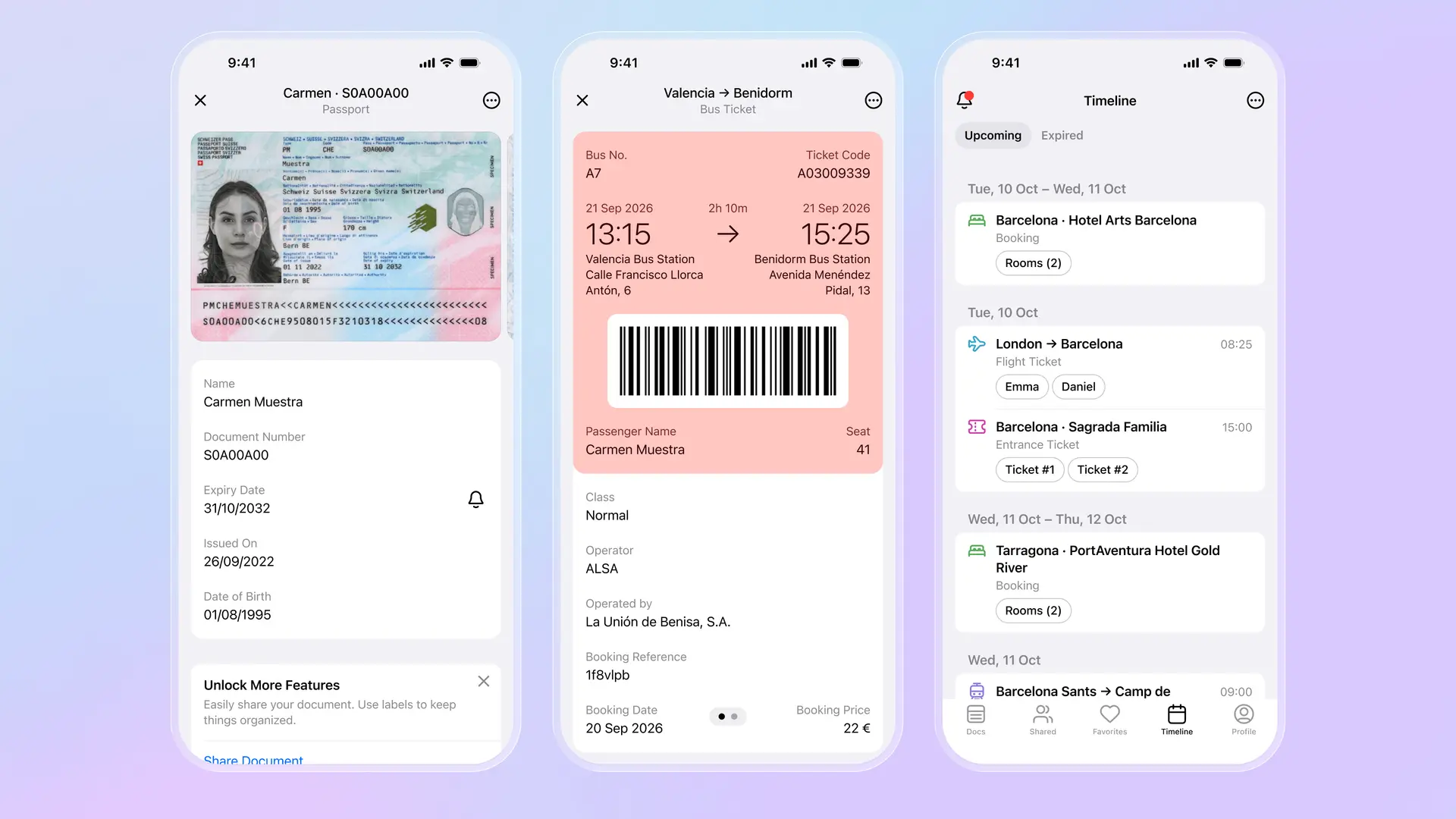
Security is where Folio differs most from basic wallets. Everything is encrypted end-to-end and protected with passkeys and biometric authentication. Even Folio's servers can't read your documents. For travelers, the trip timeline feature organizes flights, hotels, and activities chronologically, so you're not hunting through a list of passes at the airport. Shared folders let family members access the same documents without texting photos back and forth.
For sending money to friends
Venmo dominates peer-to-peer payments in the US. Splitting a dinner bill, paying rent to a roommate, settling up after a group trip: Venmo handles it instantly. The social feed showing who paid whom is either a feature or a privacy concern depending on your perspective, but you can make transactions private. The Venmo debit card lets you spend your balance at physical stores.
PayPal works similarly but with broader international coverage. If you're sending money outside the US or paying international merchants, PayPal reaches more places. The trade-off is a less casual interface and occasionally confusing fee structures for currency conversion.
For managing multiple cards
Curve solves card clutter differently. Link all your Visa and Mastercard accounts to Curve, then add just Curve to Apple or Google Wallet. At checkout, one card handles everything. You decide later which underlying account actually pays. The "Go Back in Time" feature lets you move a charge to a different card up to 30 days after the purchase. For people who optimize credit card rewards by spending category, Curve eliminates the fumbling to find the right card.
For loyalty programs
Stocard digitizes the stack of loyalty cards cluttering your physical wallet. Scan the barcode, and the card lives in the app. At checkout, show the barcode on your screen instead of carrying plastic. Stocard also surfaces deals and offers from retailers you've added. The limitation: it's just loyalty cards. No payments, no documents, no tickets. But for consolidating rewards programs, it works well.
Building your wallet stack
Most people need two or three apps, not one. Apple Wallet or Google Wallet handles payments and compatible passes. Folio stores documents, organizes travel, and secures anything your default wallet rejects. Venmo or PayPal covers money transfers. Curve is optional but useful if you juggle multiple credit cards.
The goal isn't minimizing apps. It's knowing exactly where everything lives. When you need your boarding pass, it's in Apple Wallet. When border control asks for your passport, it's in Folio. When your friend asks for their share of last night's dinner, it's in Venmo. No more searching through screenshots, email, and random PDFs hoping to find the right document before the gate closes.
Download Folio Wallet
Available free on iOS and Android


Keep reading
Best identity verification platforms in 2025
Research
Dec 19, 2025
Best identity verification platforms in 2025
Research
Dec 19, 2025
The EU is giving everyone a digital ID wallet. Here's what that means.
Product
Oct 25, 2025
The EU is giving everyone a digital ID wallet. Here's what that means.
Product
Oct 25, 2025
How NFC chip scanning verifies your passport in seconds
Business
Oct 20, 2025
How NFC chip scanning verifies your passport in seconds
Business
Oct 20, 2025