Jul 22, 2025
ProductYou have 30 seconds to find your boarding pass. Where is it?
The gate is closing, your phone has 47 PDFs, and the barcode is somewhere. Here's how to never lose a boarding pass again.
The gate agent is waiting. You're scrolling through email, searching "boarding pass," finding six results from different trips. You open the Files app. There are 47 PDFs. You try the airline app but it logged you out. You need the password. The queue behind you is getting impatient. Your flight is boarding.
This happens because boarding passes end up scattered across your iPhone with no reliable way to find them when you need them most.
Why this keeps happening
Your boarding pass arrives as an email attachment. You download the PDF to look at it, then forget where it went. The Files app buries it among dozens of other downloads. Three weeks later, you can't find it.
The airline app works, but only for that airline. Fly Ryanair to Barcelona, then Vueling to Paris, and you need two different apps. Each requires login. Each times out. Each stores tickets differently.
Apple Wallet is great when it works. Double-tap to access your pass instantly, even from the lock screen. But many airlines don't support it. Budget carriers especially. And if your airline doesn't add passes automatically, you're back to hunting through email.
Screenshots seem like the solution until you have 2,000 photos and can't find anything. "It's somewhere in October" doesn't help when you're standing at the gate.
What actually works
Folio takes boarding passes from anywhere. Forward the confirmation email. Upload the PDF. Photograph a printout. It extracts the flight details, the barcode, the seat, the gate, the baggage allowance. Everything appears on a timeline sorted by date.
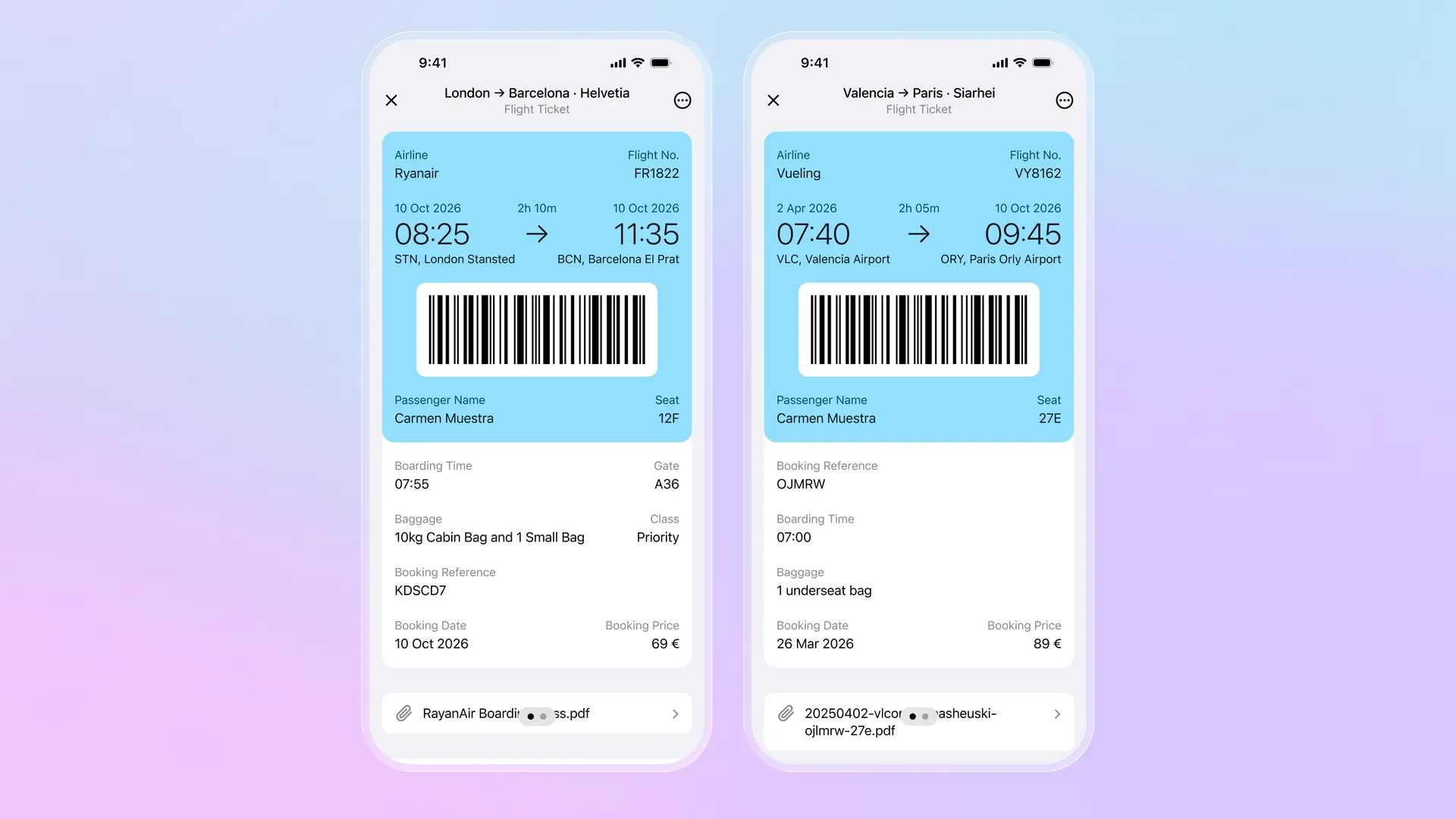
At the gate, you open one app. Your flights are sorted by date. Today's flight is at the top. The barcode is displayed prominently, ready to scan. No searching. No login. No scrolling through email. Works offline too, so you're not dependent on airport WiFi.
The details you actually need are visible at a glance: seat 12F, gate A36, boarding time 07:55, 10kg cabin bag. The original PDF stays attached if the gate agent asks for it, but the barcode is what matters and it's right there.
The practical difference
With multiple apps and email, you spend 30 seconds (or more) finding your boarding pass while the gate agent waits. With everything in one place, you spend two seconds: open app, tap flight, show barcode.
This matters most when things go wrong. Flight cancelled, rebooked on a different airline, new boarding pass arrives while you're running through the terminal. With Folio, forward the email, the new pass appears in your timeline immediately. No hunting through inbox. No trying to remember which airline app to download.
If you fly once a year with one airline, their app is probably fine. If you fly multiple airlines, book through different sites, or just want to stop losing boarding passes, having everything in one searchable timeline solves the problem permanently.
Download Folio Wallet
Available free on iOS and Android


Keep reading

Best identity verification platforms in 2025
Research
Dec 19, 2025
Best identity verification platforms in 2025
Research
Dec 19, 2025
The EU is giving everyone a digital ID wallet. Here's what that means.
Product
Oct 25, 2025
The EU is giving everyone a digital ID wallet. Here's what that means.
Product
Oct 25, 2025
How NFC chip scanning verifies your passport in seconds
Business
Oct 20, 2025
How NFC chip scanning verifies your passport in seconds
Business
Oct 20, 2025