Jul 18, 2025
ProductYour friend booked the hotel. Now they're stuck in traffic. Do you have the confirmation?
Group trips fall apart when one person has all the bookings. Here's how to make sure everyone has access to everything.
You're standing at the hotel front desk. Your friend booked the room, but their flight was delayed. The receptionist is asking for the confirmation number. You check your messages: nothing. You search your email: nothing. The booking is in your friend's inbox, on a phone that's currently somewhere over the Atlantic.
This is the single point of failure problem. Group trips spread information across multiple people's inboxes. When the person with the booking isn't there, everyone else is stuck.
Why forwarding doesn't work
The obvious solution is forwarding emails. Someone books the hotel, forwards the confirmation to everyone. Someone else books train tickets, forwards those too. In theory, everyone has everything.
In practice, it falls apart. The forwarded email gets buried under 50 other messages. Someone's phone is on airplane mode and the attachment won't load. The person who needs the confirmation is scrolling through a group chat trying to find a screenshot from three weeks ago. Updates don't sync. Someone changed the reservation but forgot to forward the new confirmation.
Shared folders: everyone has everything
The real solution is shared access to documents, not copies of documents. When you add a hotel booking to a shared folder, everyone with access sees it immediately. Not a forwarded copy that might be outdated, but the actual document you're looking at.
Folio works this way. Create a folder for your trip. Import your bookings: forward the confirmation email, upload the PDF, photograph the printout. Invite your travel companions. Now everyone sees the same timeline with the same documents.
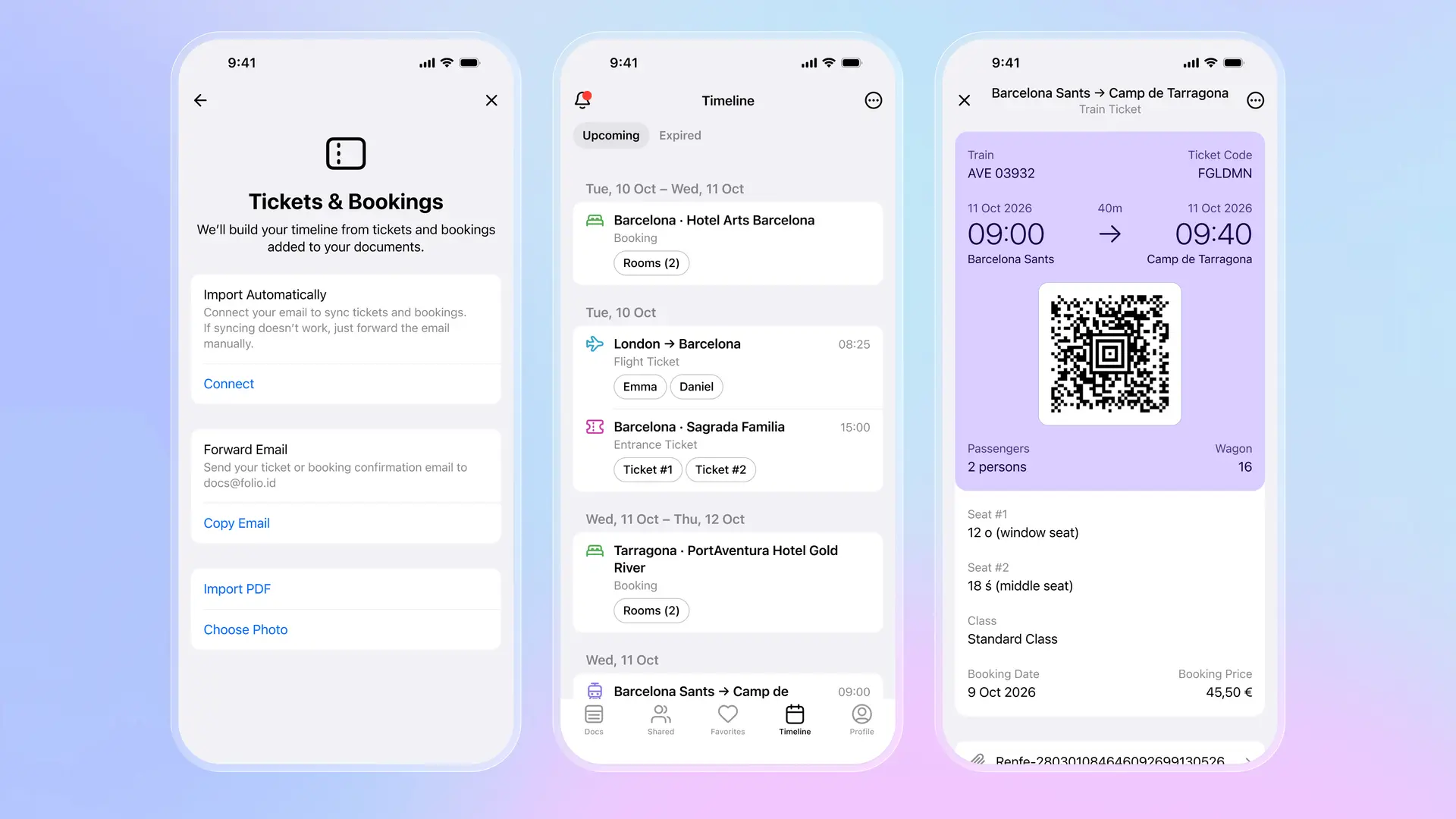
The flight shows both travelers tagged. The train ticket shows seats for two people. The hotel confirmation is visible to everyone in the folder. When you're at the front desk and your friend is delayed, you pull up the same confirmation they would show. No searching. No "can you screenshot that?"
How it works in practice
Before your trip: one person creates a shared folder and invites the others. As bookings come in, anyone can add them. Forward the confirmation email to your Folio address, or upload the PDF directly. The app extracts dates, times, confirmation numbers, and builds a timeline.
During your trip: anyone can show any document. At the train station, either person can pull up the tickets with the QR code. At the museum, anyone has the entrance tickets. If plans change and someone adds a new restaurant reservation, it appears for everyone immediately.
The practical difference: the person who booked doesn't need to be present. If one friend is running late, the others check in to the hotel. If someone's phone dies, the other person has the train tickets. No one is the single point of failure anymore.
Group trips work better when everyone has access to everything. Not screenshots that get lost, not forwarded emails that get buried, but shared documents that stay current. Less "can you send me that again?" More actually enjoying the trip together.
Download Folio Wallet
Available free on iOS and Android


Keep reading

Best identity verification platforms in 2025
Research
Dec 19, 2025
Best identity verification platforms in 2025
Research
Dec 19, 2025
The EU is giving everyone a digital ID wallet. Here's what that means.
Product
Oct 25, 2025
The EU is giving everyone a digital ID wallet. Here's what that means.
Product
Oct 25, 2025
How NFC chip scanning verifies your passport in seconds
Business
Oct 20, 2025
How NFC chip scanning verifies your passport in seconds
Business
Oct 20, 2025