Feb 25, 2025
ResearchPass2U alternative: A smarter way to organize your passes
Pass2U extends Apple Wallet with custom cards. But what if you need more? Discover an app that organizes all your documents with real security.
You've got your gym membership in Pass2U. Your coffee shop loyalty card too. They show up in Apple Wallet, right there on your lock screen when you walk in. It works great until you're at the airport and need your boarding pass, which is a PDF in your email. Or at the doctor's office, where your insurance card is a photo buried in your camera roll. Or traveling abroad, where your passport scan is in the Files app somewhere.
Pass2U solves one problem well: turning barcodes into Apple Wallet passes. But travel and daily life involve more than barcodes. You need the actual ticket with seat details, the PDF with terms and conditions, the document with your photo on it. Pass2U can't help with any of that.
What Pass2U actually does
Pass2U creates .pkpass files for Apple Wallet. You scan a barcode from a loyalty card, and it generates a pass that Apple Wallet can display. The same works for membership cards, coupons, and simple tickets. When you're near a relevant location, the pass can pop up on your lock screen. For stores that don't offer native Apple Wallet integration, this is genuinely useful.
The free version limits how many passes you can create. Pass2U Pro removes that limit and adds features like pass sharing and custom designs. If all you need is barcode storage for Apple Wallet, it does the job.
Where the problems start
Pass2U extracts the barcode from your ticket and creates a pass. But it throws away everything else. Your concert ticket becomes a QR code, but the seating chart, entry instructions, and venue details are gone. Your flight becomes a barcode, but the baggage allowance, booking reference, and gate information aren't there. When you're standing at the venue and they ask about your seat, you're back to searching through emails.
There's also the platform problem. Pass2U only works with Apple Wallet, which means iOS only. If you switch to Android, or if your travel companion uses Android, Pass2U offers nothing. Your carefully organized passes don't transfer. And if you lose your iPhone without a backup, those passes are gone. There's no cloud sync, no cross-device access.
For documents beyond barcodes, Pass2U simply doesn't apply. Your passport, driver's license, travel insurance, vaccination records, and hotel confirmations need to live somewhere else. You end up with passes in Apple Wallet, PDFs in Files, photos in Camera Roll, and no single place to find what you need.
What a complete wallet app looks like
Instead of extracting just the barcode, a proper wallet app stores the entire ticket. The scannable code is there for when you need it, but so is everything else: seat information, booking details, terms, and attached PDFs. When you add a flight, you see the full itinerary, not just a barcode strip.
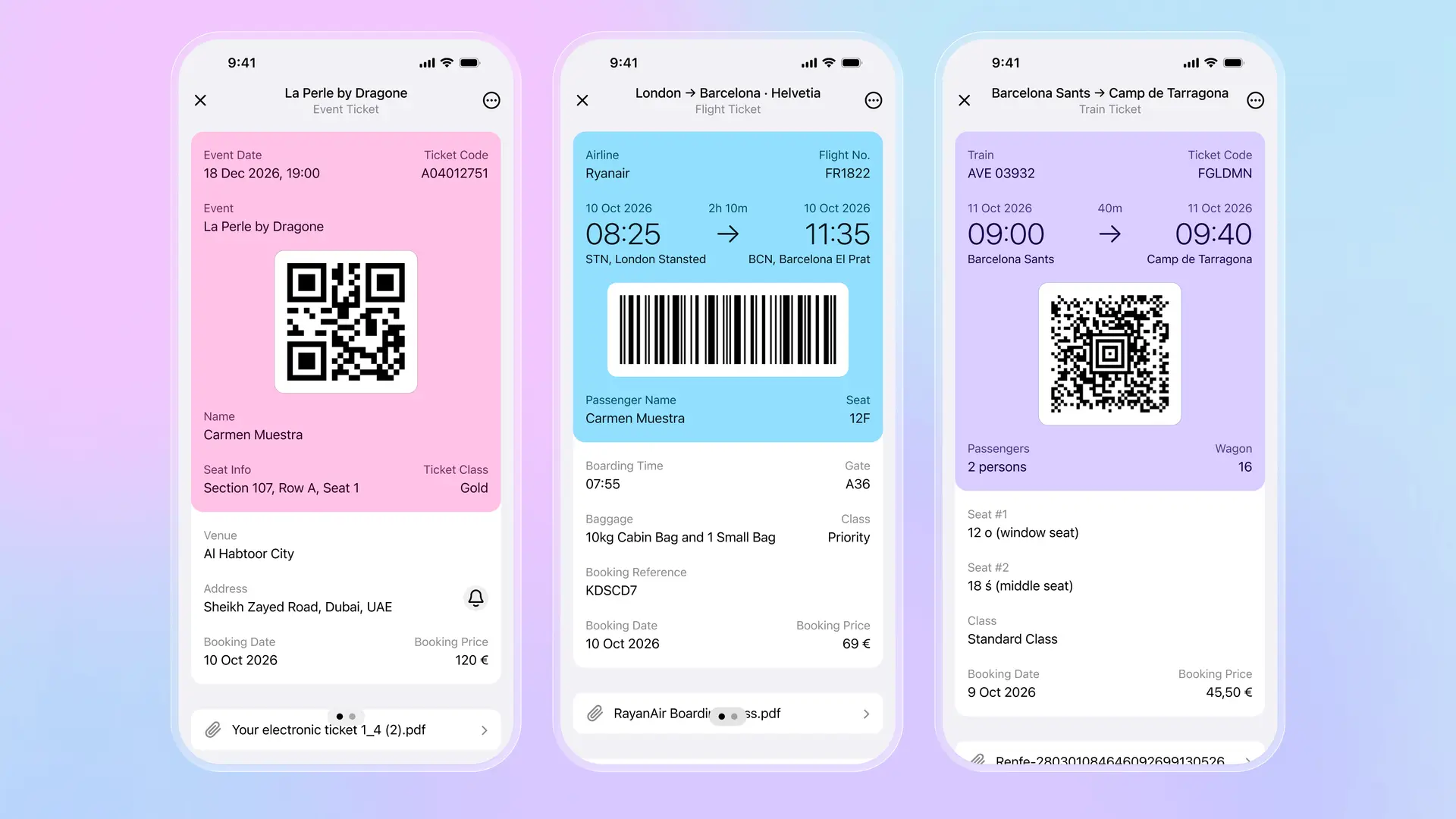
Folio Wallet takes this approach. Add an event ticket, and you get the QR code plus the venue, seat, date, and price. Add a flight, and you see the route, times, passenger info, and booking reference alongside the boarding barcode. Add a train ticket, and the wagon, seat, and class information are all visible. The original PDF stays attached if you need to reference it.
Beyond tickets, you can store identity documents like passports and driver's licenses, insurance cards with policy details, hotel bookings with confirmation numbers, and any other document you'd otherwise scatter across multiple apps. Everything syncs across iOS and Android with AES-256 encryption, so switching phones or sharing with travel companions isn't a problem.
| Feature | Pass2U | Folio Wallet |
|---|---|---|
| Barcode/QR passes | Yes | Yes |
| Full ticket details | Barcode only | Complete ticket with all info |
| PDF attachments | No | Yes |
| ID documents | No | Passports, licenses, IDs |
| Platform | iOS only | iOS and Android |
| Cloud sync | No | Yes, encrypted |
| Security | Local storage only | AES-256, zero-knowledge |
| Price | Free / Pro subscription | Free |
Pass2U makes sense if you specifically want loyalty cards in Apple Wallet and nothing else. For everything beyond that, including actual tickets with details, travel documents, identity cards, and cross-platform access, Folio Wallet handles what Pass2U can't.
Download Folio Wallet
Available free on iOS and Android


Keep reading
Best identity verification platforms in 2025
Research
Dec 19, 2025
Best identity verification platforms in 2025
Research
Dec 19, 2025
The EU is giving everyone a digital ID wallet. Here's what that means.
Product
Oct 25, 2025
The EU is giving everyone a digital ID wallet. Here's what that means.
Product
Oct 25, 2025
How NFC chip scanning verifies your passport in seconds
Business
Oct 20, 2025
How NFC chip scanning verifies your passport in seconds
Business
Oct 20, 2025