Jul 24, 2025
ResearchWhere did I put that ticket? (The event ticket organization problem)
Concert in Ticketmaster, conference badge in email, theme park as a screenshot. Here's how to stop losing tickets.
You're at the venue entrance. The line is moving. You search your email for "ticket" and get 47 results. None of them is the one you need. You try "concert" and find last year's show. The person behind you sighs. You scroll frantically through screenshots, then remember the ticket might be in a different email account entirely.
This happens because tickets are fragmented across a dozen places. And every app that claims to solve this actually makes it worse.
The fragmentation problem
Look at where your tickets actually live. The concert is in the Ticketmaster app, but you can't export it anywhere else. The conference badge came as an email PDF. The theme park sent a booking confirmation with a barcode buried in the middle of the page. The theater emailed a screenshot. The sports game is in a team-specific app you downloaded once.
Each ticket is locked in its own silo. When you need one, you have to remember which silo it's in, open the right app or email, and hope you can find it before the line loses patience.
What each app actually does
Ticketmaster and Eventbrite store tickets, but only tickets you bought through them. You can't add a theater ticket or conference badge. They're ticket sellers first, organizers second. If you buy from multiple sources, you still have multiple apps.
Apple Wallet and Google Wallet work great for compatible tickets. Double-tap to access, even from the lock screen. The problem: many events don't support wallet integration. That theme park PDF won't go into Apple Wallet. Neither will most conference badges or smaller venue tickets.
Screenshots and email technically work, but they're unsearchable, unorganized, and easy to lose. Three months from now, you won't remember if that concert ticket was a screenshot, a PDF, or forwarded from someone else.
One place for everything
Folio takes tickets from anywhere. Forward the email, upload the PDF, photograph the paper ticket. It extracts the event name, date, venue, seat information, and barcode. Everything appears in a timeline sorted by date.
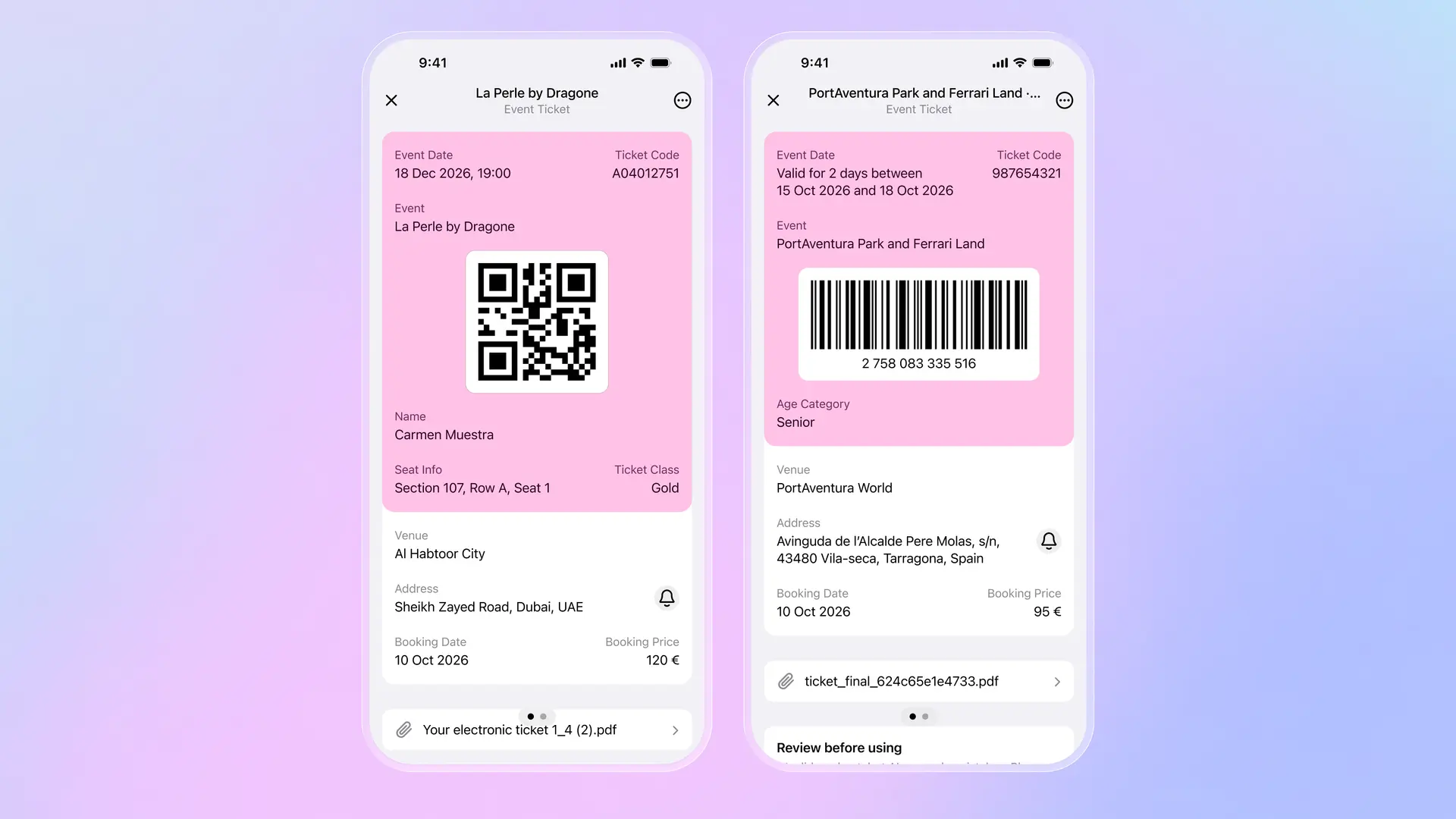
Standing at the venue entrance, you open one app. Your tickets are sorted by date. Today's event is at the top. Tap it. The barcode or QR code is right there, ready to scan. No searching through email. No remembering which app you bought it from. No frantically scrolling through screenshots.
For theme parks and multi-day events, all the details are visible at a glance: valid dates, age categories, venue address. For concerts and theater, seat information and ticket class appear prominently. The original PDF or image stays attached if you need it, but you rarely do because everything important is already extracted.
The practical difference: instead of five apps and three email searches, you have one timeline. Whether it's a concert tonight, a conference next week, or a theme park trip next month, everything lives in the same place. Works offline too, so you're not dependent on venue WiFi when you need to show your ticket.
Download Folio Wallet
Available free on iOS and Android


Keep reading
Best identity verification platforms in 2025
Research
Dec 19, 2025
Best identity verification platforms in 2025
Research
Dec 19, 2025
The EU is giving everyone a digital ID wallet. Here's what that means.
Product
Oct 25, 2025
The EU is giving everyone a digital ID wallet. Here's what that means.
Product
Oct 25, 2025
How NFC chip scanning verifies your passport in seconds
Business
Oct 20, 2025
How NFC chip scanning verifies your passport in seconds
Business
Oct 20, 2025